
Time Tracking
& Approvals
Effortless time tracking with built-in approvals.
ROLE
Lead Product Designer
TIMELINE
8 Weeks (Strategy & Design)
TEAM
1 PM, 8 Engineers, 2 UXD
Case study overview (video summary)
Accessible video summary of the case study, offering an alternate format to the written content for easier consumption.



EXECUTIVE SUMMARY
Distributed teams relied on fragmented tools for time tracking, leading to delays, errors, and poor operational visibility.
I led the UX strategy and execution for the TimeTracker & Approvals platform, partnering closely with product and engineering to redesign the end-to-end experience across mobile time entry and desktop approvals.
Our focus was to reduce friction, provide operational context, and enable faster, more confident decisions at scale — from the field to the boardroom.
41%
Reduction
On time entry errors
22%
Increase
In mobile adoption by field engineers
23%
Increase
On time submission of timesheets by field engineers
The World Before
Before this project, time tracking technically worked.
Employees and field engineers logged time on mobile, often at the end of the day or between jobs. Entries were quick, sometimes incomplete, and heavily dependent on memory. On the other side, managers reviewed timesheets on desktop days later, trying to understand what the hours actually represented.
The system treated time entry as a focused task and approvals as a verification step. In reality, both were decision-making moments happening under constraints.
Nothing was obviously broken yet.
But the system relied on people compensating for missing support.

Time tracking worked by leaning on human memory, not system support.
Understanding the Work Before Designing Anything
Before designing solutions, we focused on how people actually worked.
We observed field engineers entering time in bursts—between tasks, while switching jobs, or after already moving on mentally. We watched managers approve timesheets in tight windows between meetings, scanning for exceptions rather than reviewing every line.
We also observed managers approving timesheets in compressed windows between meetings. They didn’t review every entry in detail; they scanned for anomalies, inconsistencies, and exceptions.
Two patterns stood out:
Time entry was interrupt-driven, not linear
Approvals were decision-driven, not data-driven
Most issues didn’t stem from bad intent. They came from poor defaults, missing job context, and fragmented workflows between mobile and desktop.
The issue wasn’t the timesheet UI.
It was the gap between entry and approval, where context quietly disappeared.


You can’t fix approvals without fixing what’s captured at entry.
Where Things Broke
As teams scaled, the consequences of that gap became visible.
On the entry side, users logged time quickly but inconsistently. Details were lost, overlaps crept in, and corrections were deferred.
On the approval side, managers struggled to validate entries confidently. Why did this task take longer? Why did hours spike? Why did two jobs overlap?
Answers existed — but only in people’s heads.
What made this difficult to detect early was that neither entry nor approval failed outright.
Problems accumulated across the workflow and surfaced late.
Small entry gaps compounded into large approval friction.
Guiding the Team Through Ambiguity
At this point, ambiguity was high. Designers wanted to improve entry speed and approval clarity. Product wanted flexibility across roles. Engineering flagged Salesforce performance constraints and data handling limits.
My role was to slow the team down and change how we approached the problem. Instead of starting with UI patterns or competitive research, I guided the team to:
Map the full workflow end-to-end
Identify where mistakes actually occurred
Keep what already worked (Approval process, Time entry frequency, templates)
I repeatedly brought the conversation back to one question:
"What job is the user trying to do, what decision is the user making right now?"
Once we aligned on that, design debates became much clearer.


Design clarity emerged once entry and approval were treated as one decision chain.
The Strategic Shift
Initially, time entry and approvals were treated as separate problems.
The seperation between time-entry and approvals didn't hold up.
We reframed the experience as one operational loop:
-
Mobile entry sets up future approval
-
Desktop approval reflects back on better entry
The strategy became simple:
STRATEGY
Capture just enough context during entry to remove doubt during approval.
Leading Through Tensions and Trade-offs
This project surfaced familiar tensions. Designers pushed for richer context capture. Product pushed for configurability. Engineering pushed back on complexity and performance risk.
Rather than debating preferences, I reframed decisions around risk and reversibility:
What’s the cost of missing context at entry?
What’s the cost of slowing users down?
Which mistakes are hardest to undo later?
Some early designs added too much friction to entry and were cut. Others under-captured context and shifted burden to approvals — also cut.
I wasn’t always right. I initially supported exposing more editable fields during approval, but testing showed it increased cognitive load and reduced confidence. Pulling that back improved both speed and trust. Over time, the team shifted from designing screens to designing flows, decisions, and consequences.
Leadership here meant balancing capture and control — not maximising either.
What We Ultimately Built
Desktop: Contextual, Confident, Efficient-Entry & Approvals
We focussed on the core Jobs to be done, clearing out the UI fluff.
Consolidated views across time and tasks
Auto-Logged tasks
Corrections without losing context
Quick & contextual approvals


Mobile: Reliable Time Entry Under Real Conditions
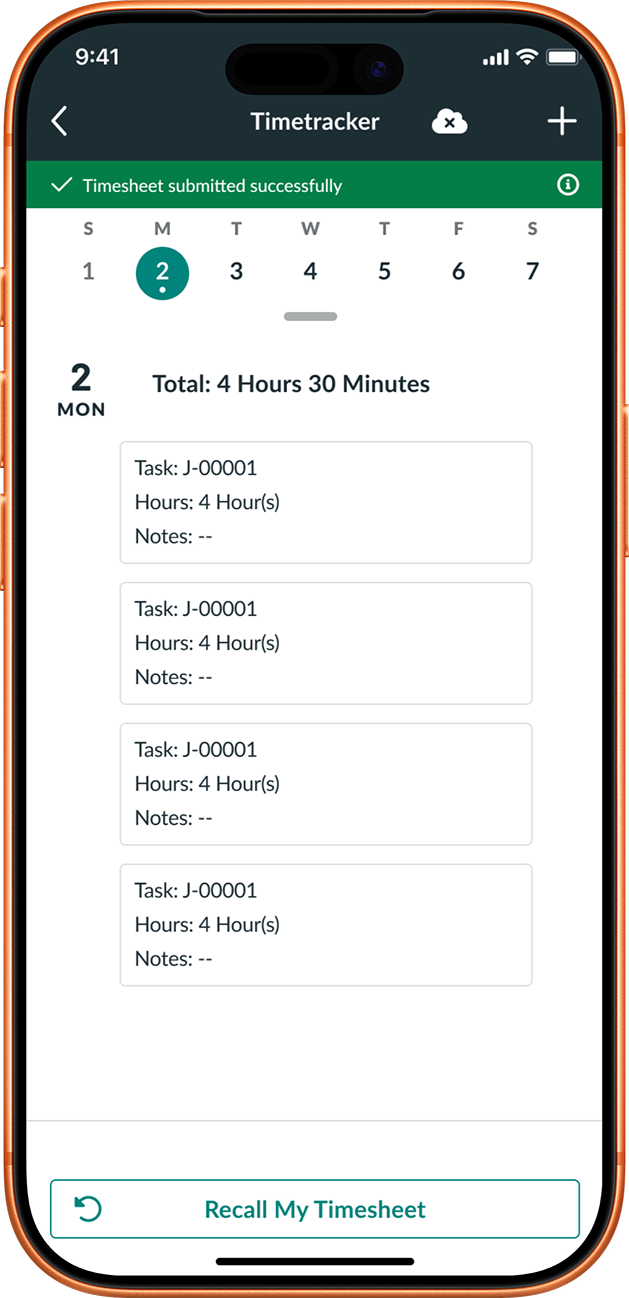
The experience minimised required input, and provided clear recovery and edit paths—while automatically capturing time entries on job status changes—so users could log work accurately with minimal effort under field conditions.


Accuracy came from better defaults, not more fields.
What Changed
After launch:
-
Time entries became more consistent
-
Managers approved faster and with more confidence
-
On-time submissions increased
-
Back-and-forth corrections dropped significantly
Time data became reliable end to end
What I Learned
This project reinforced that:
01
Time entry and approvals must be designed together
03
Capturing the right context matters more than capturing all context
02
Defaults and guardrails outperform flexibility
04
Saying “no” early prevents expensive fixes later
"Reducing uncertainty beats reducing steps."
What I Would Do Differently
If I were to do this again, I’d prototype the entry–approval loop earlier and invest more in onboarding to help users understand why certain constraints exist.
Earlier alignment would have reduced churn and accelerated confidence.